Wizard getting cut off

Question:     

I am using my laptop which has a resolution of 1600 by 900.  When using the Setup Wizard, the screen is cut off at the bottom.  What could be causing this and how can I fix it?


Answer:

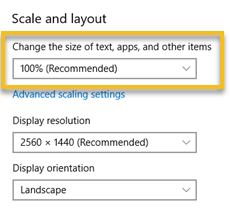
Be sure that the recommended Scale is used for the resolution you are using.  To change this, right-click the desktop and choose Display Settings.   Then, under Scale and Layout, change to the recommended settings.

For example:


Related topics

Toolbox drawing tools are grayed out    

Toolbar bottom is cut off

Freeze the left column

Microsoft Teams screen flicker

Move Milestones to primary monitor


Applies to Milestones Professional:      2019        2021        2023        2025


The fast easy way to schedule your projects:  Milestones Software by KIDASA Software, Inc. www.kidasa.com

Copyright © 2025 KIDASA Software, Inc. All rights reserved.