Set symbol position via automation
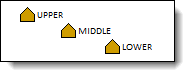
Answer:This can be done for individual symbols (using SetSymbolProperty) and can also be set in the toolbox (SetToolboxSymbolProperty).To change the level of an individual symbol, use the "VerticalLevel" property for the SetSymbolProperty method. (0=middle, 1=upper, 2=lower) Example: Set the 3rd symbol on the 1st row to the upper level: .SetSymbolProperty(1,3,"VerticalLevel",1) To make this setting in the toolbox, use the "VerticalLevel" property for the SetToolboxSymbolProperty method. (0=middle, 1=upper, 2=lower) Example: Set the third toolbox symbol to the lower level: .SetToolboxSymbolProperty(3,"VerticalLevel",2)
For complete Automation (programming) help, choose Help | Automation Help.
|
|
|
Automation interface to Milestones Adjust task row height with automation |
 2019
2019