Refresh a Milestones Professional schedule from several Microsoft Project schedules

Question:     

I want to create a Milestones Professional schedule and refresh it from several Microsoft Project schedules.  Is there a way to accomplish this with one refresh instead of having to refresh once for each Microsoft Project schedule?


Answer:

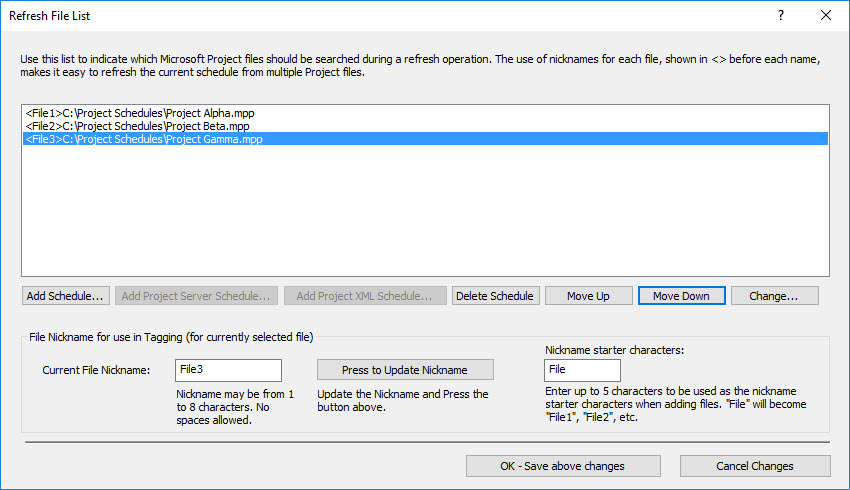
Usually one Milestones Professional schedule is updated with the dates from a single Microsoft Project schedule.  However, you may want to create a presentation schedule which contains dates from several projects you are tracking with Microsoft Project.  Of course, you would like to update the presentation schedule when the dates on the Microsoft Project schedules change.  Is this possible?  YES!

A feature in Milestones Professional makes it easy to create a list of Microsoft Project schedules which will refresh a single Milestones Professional schedule.  Once the list is created it is saved with the Milestones Professional schedule you will be able to do a single refresh and update the presentation schedule from ALL of the Microsoft Project schedules. For more information about how to use this feature, see:

Update a Milestones schedule from multiple Microsoft Project schedules


Related topics

Refresh a Milestones schedule from Multiple Microsoft Project Schedules (Milestones Help)   

Add a missing field from Microsoft Project

Add a tag to a symbol

Compare two files after refresh

Don't want to show unmatched Microsoft Project tasks in the refresh report

Highlight changed dates when refreshing

Microsoft Project to Milestones Wizard refresh reports

No changes after schedule refresh

Symbol tags across multiple files


Applies to Milestones Professional:      2019        2021        2023        2025


The fast easy way to schedule your projects:  Milestones Software by KIDASA Software, Inc. www.kidasa.com

Copyright © 2025 KIDASA Software, Inc. All rights reserved.