Print to a banner printer

Question:     

Can I print a banner, say 3 feet by 15 feet, with your product and have all the data come out on one page?


Answer:

Yes.  Here's what you need to do:

  1. Choose the Layout tab.

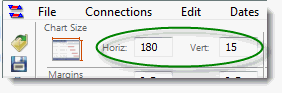
  2. In the Page Size section, change the Horizontal (Horiz.)  to 180 inches (15 ft..) and set the Vertical (Vert.) to 36 inches:

  3.  

  4. On the File tab, choose the Printing Options button.  

  5. Choose Use Specified Size:  


Related topics

Specifying print size

Scale to fit papr size

Display collapse/expand indicators when printing   

Hide a column when printing

Print a large schedule in small sections

Printing (Milestones Professional Help)


Applies to Milestones Professional:      2017        2019         2021         2023         2025


The fast easy way to schedule your projects:  Milestones Software by KIDASA Software, Inc. www.kidasa.com

Copyright © 2025 KIDASA Software, Inc. All rights reserved.