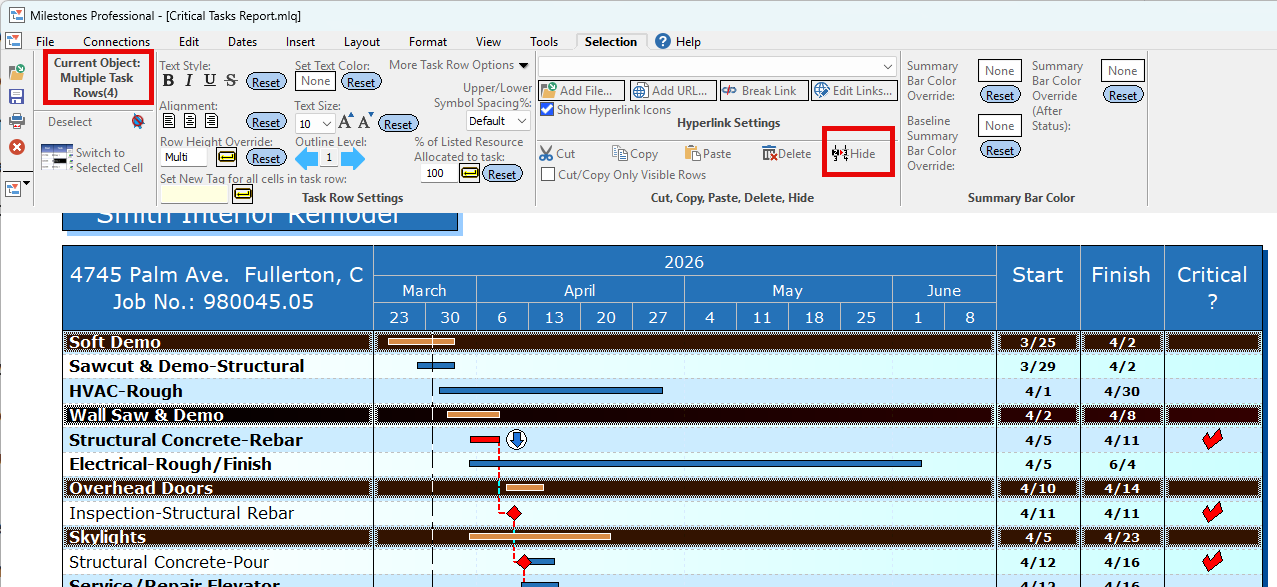
Hide several task rows in a single operation

Question:     

I know how to hide a single task.  Is there a way to hide several tasks in a single operation?


Answer:

Yes.  Follow these steps for rows which are non-contiguous.

  1. Click  (the arrow tool.)
  2. Hold down the CTRL key.
  3. In the column area, click the first row to be hidden.
  4. While holding down the CTRL key, continue selecting rows to be hidden.
  5. Click the Hide button on the toolbar.   

Follow these steps for rows which are contiguous (together.)

  1. Click  (the arrow tool.)
  2. Hold down the SHIFT key.
  3. In the column area, click the first row to be hidden.
  4. While holding down the SHIFT  key, click the last row to be hidden.
  5. Click the Hide button on the toolbar, or choose Hide tasks on the right-click menu.


Related topics

Hide vertical connectors

Hide the legend


Applies to Milestones Professional:      2017        2019         2021         2023         2025


The fast easy way to schedule your projects:  Milestones Software by KIDASA Software, Inc. www.kidasa.com

Copyright © 2025 KIDASA Software, Inc. All rights reserved.