Have many users view a schedule on a company network

Question:     

Is it possible to share a Milestones Professional schedule with others on the company network?

I often am forced to save several versions of a file because another user opens my file, forcing me to "save as" to another version when I need to make changes.  Is there a way for me to know who has my file open?  Is there some way to prevent this problem?


Answer:

The easiest way to allow others to view your schedule without changing it is to set a password for your schedule and allow network users to view it "read-only".  You will still be able to edit the schedule but others will only be able to view the last saved schedule.

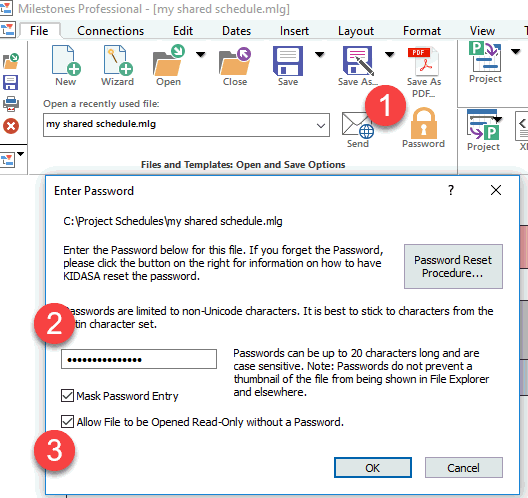
Set a password and allow read-only access:

  1. On the File tab, choose Password.

  2. Add a password you can easily remember.

  3. Allow File to be Opened Read-Only without a password.


Related topics

Templates

Save file as chart or template?

Charts (Milestones Help)

Templates (Milestones Help)


Applies to Milestones Professional:      2019        2021        2023        2025


The fast easy way to schedule your projects:  Milestones Software by KIDASA Software, Inc. www.kidasa.com

Copyright © 2025 KIDASA Software, Inc. All rights reserved.