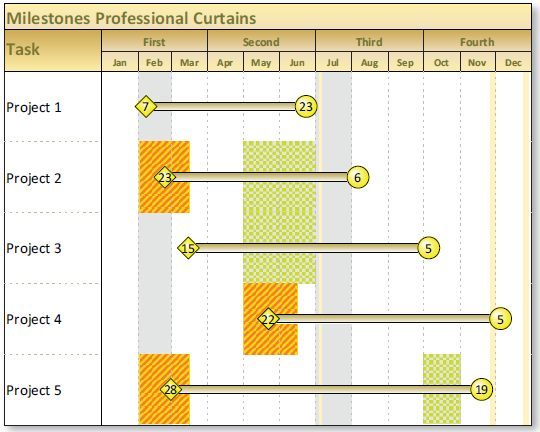
Curtains

Question:     

Is it possible to shade a date range on my schedule?


Answer:

Milestones Professional allows you set up any number of "curtains" that shade date ranges on your schedule.  To set these up, choose Format | Gridlines, Shading and Curtains | Curtains.  

  1. Choose Format | Vertical Shading | Curtains (Shade by Date Range).
  2. In the Curtain Setup dialog box, click the Add button to add a new curtain.
  3. Click Date Range and enter the Start Date and Time (when the curtain should begin) and End Date and Time (when the curtain should end).
  4. Next to Pattern Color, choose Change to select a color for the Curtain Fill Pattern.
  5. Next to Background Color, choose Change to select a color for the background of the Curtain Fill Pattern.
  6. Under Curtain Fill Pattern, choose from the drop-down list of patterns.
  7. Press OK and Done to see the curtain applied to the schedule.


Related topics  

More about curtains  (Milestones Professional Help)    

All you need to know about date headings

Standard curtains for all my projects

Shade Holidays

Vertical milestone lines


Applies to Milestones Professional:      2019        2021        2023        2025


The fast easy way to schedule your projects:  Milestones Software by KIDASA Software, Inc. www.kidasa.com

Copyright © 2025 KIDASA Software, Inc. All rights reserved.