Create a multi-colored bar

Question:     

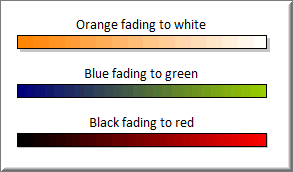
How do I create a multi-colored bar which fades from one color to the next?


Answer:

Here's an example of what is possible:

Set up a bar in your toolbox:

  1. Double-click a bar in the toolbox.

  2. Under Special Color Effects, choose Fade to Right.

  3. For Target Color, choose a color (different from the bar's Fill Color)

(The bar is now ready to be added to your schedule.)


Related topics

Create and add custom symbols to the toolbox

Customize your toolbox

Copy a toolbox to another schedule

Can I set up a default format and toolbox?

Above the bar symbol in the toolbox

Create your perfect Milestones toolbox

Need larger toolbox


Applies to Milestones Professional:      2017        2019         2021         2023         2025


The fast easy way to schedule your projects:  Milestones Software by KIDASA Software, Inc. www.kidasa.com

Copyright © 2025 KIDASA Software, Inc. All rights reserved.