Browse templates without opening them

Question:     

Is there a way to look through the sample templates or search them and get a preview without opening every single one to see if they're what I want?


Answer:

There are a couple ways to do this.

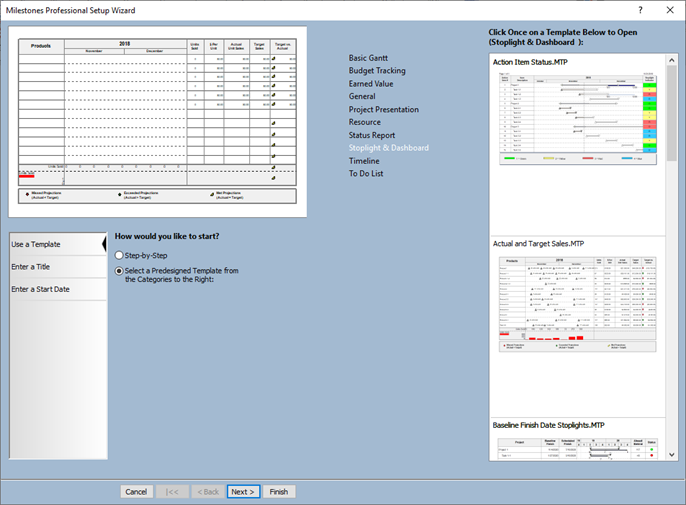
First method - Use the New Schedule Wizard

  1. On the File tab choose Wizard.
  2. In the wizard choose Select a Predesigned Template.
  3. Here, you can pick a category and then scroll through the types below the category:


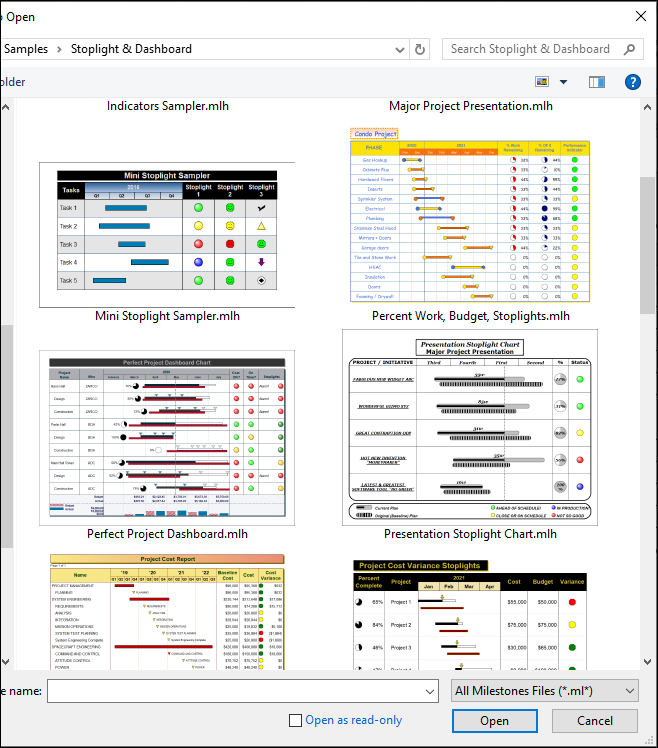
Second method: Use Windows Explorer

  1. Start Windows File Explorer.
  2. Navigate to the folder which has the templates.  This is usually Program Files\KIDASA\Milestones Professional
  3. Right click and choose View - Extra Large Icons.XXX\Standard Templates.  (Replace XXXX with version number)
  4. Don't find what you are looking for?  In Milestones try File | Open | Sample Chart.  Pick a category.  If a list appears, just right-click and choose View - Extra Large Icons.


Related topics

Templates

Save file as chart or template?

Charts (Milestones Help)

Templates (Milestones Help)


Applies to Milestones Professional:      2017        2019         2021         2023         2025


The fast easy way to schedule your projects:  Milestones Software by KIDASA Software, Inc. www.kidasa.com

Copyright © 2025 KIDASA Software, Inc. All rights reserved.